

Once Truestream starts expanding into your service area, you’ll be asked to log in to your online GLE account and register for Truestream (not share your interest, you’ve already done that). When you register, you’ll need to select an internet plan, but do you know which plan to select?
There are a few things to consider when choosing the best internet service plan for your household…don’t worry, we’ve got you!
Devices
The first thing to consider is how many devices you have or plan to have once you get connected to Truestream. But wait, what is a device?
A device is an object that connects to the internet. A Wi-Fi-enabled device connects wirelessly to the internet when available, while a wired device connects to the internet by cables.
WI-FI
A facility allowing computers, smartphones, or other devices to connect to the internet or communicate with one another wirelessly within a particular area.
Examples:
Desktop computers, laptops, tablets, cell phones, smart home technology (i.e., lighting systems, thermostats, appliances, TVs, security systems, etc.), streaming devices, gaming systems, Amazon Echo and Alexa devices, and more.
NOTE: Older devices can only transmit and receive data at their limited speeds and may be unable to fully utilize high internet speeds, leading to congested and reduced bandwidth. You may want to consider upgrading outdated devices for optimal performance.
But why does the number of connected devices matter?
Bandwidth
Each device that connects to your network can reduce the bandwidth available for other devices using the same internet connection.
BANDWIDTH
The capacity at which a network can transmit data.
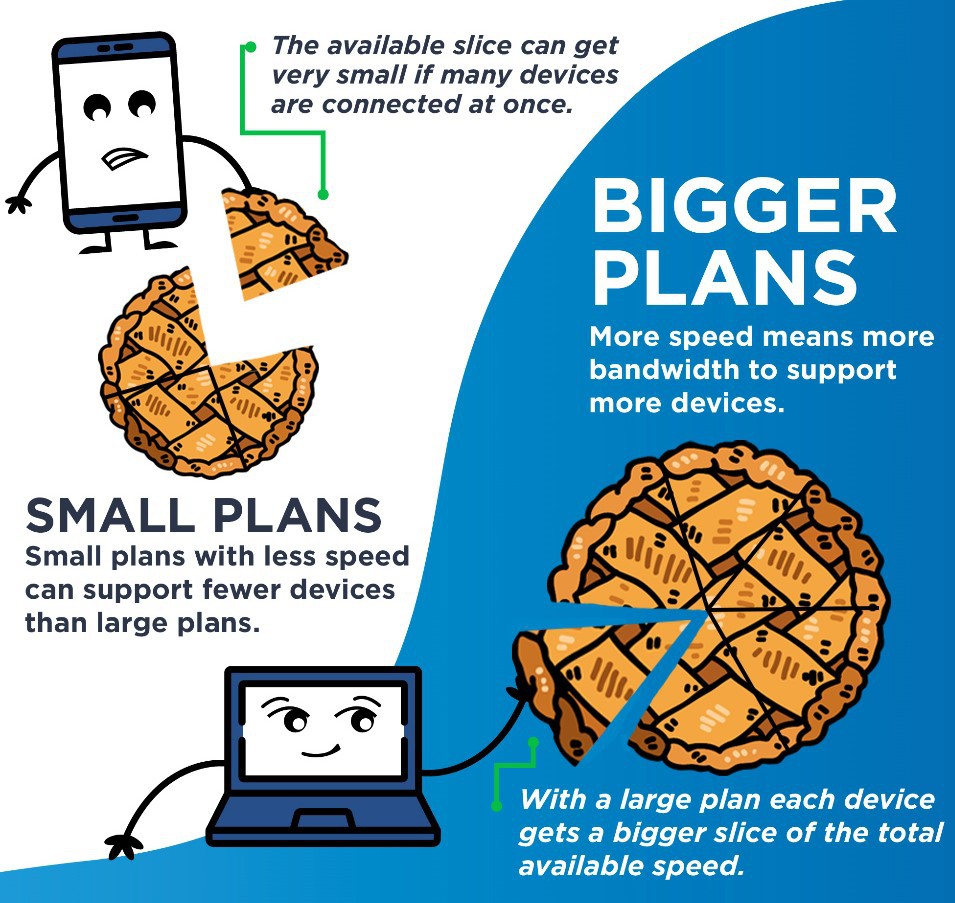
It’s also important to note that some devices eat up slices of the bandwidth pie while others eat just a sliver or crumble.
Bandwidth-hungry devices:
Smart TVs – particularly high-definition, 4K, and 4K Ultra-HD TVs, and are even hungrier when streaming.
Computers, laptops, or tablets are most hungry when video calling, online gaming, streaming, and uploading files, but not nearly as much when just browsing the internet.
Not-so-bandwidth-hungry devices:
Smart home devices like speakers (Alexa, Echo, etc.), appliances, thermostats, doorbells, security video cameras, streaming devices (Roku, Amazon Firestick, etc.).
Usage
Once you count the number of devices in your home (or plan to have), think about how you plan to use the internet, and refer to our residential internet plans below.
Basic Plan
- Great for 1-4 devices.
- Ideal for surfing, emailing, streaming music and movies, photo uploads, and social media.
- $63.99/mo.
Family Plan
- Great for 5-9 devices.
- Ideal for streaming HD, gaming, taking classes online, and video chats.
- Just $10 more a month than the Basic Plan, for double the speed.
- $73.99/mo.
Ultra Plan
- Great for 10+ devices.
- Ideal for streaming HD/4K, working from home, large file uploads, and home security.
- Best of the best.
- $99.99/mo.
Do you plan to work from home, do homework, surf the internet, pay your bills online, game, stream TV and movies, etc?
If you’re a family of five that includes an adult who works from home, includes school-aged children, has multiple computers, cell phones, TVs, a gaming system, etc., you can guess that the best internet plan for this household would be our Ultra Plan.
Suppose you’re a family of two with two cell phones, a TV for streaming an occasional movie, and a laptop for surfing the internet and paying bills online; the Basic Plan would likely be the best internet plan for you.
Still not sure?
Just pick one, and when a Truestream Solutions Representative calls to schedule your in-home installation, they can go over the plans with you and make any necessary changes. Or, once you’re connected and on a plan for a full billing cycle, you can easily switch to another plan then.
Confused about bandwidth and speed?
We’ve covered that, too! Read The Need for Speed to learn the difference between bandwidth and speed.
Questions?
We’re here to answer your questions. Call us at 888-485-2437 during business hours, or visit our website anytime.